

AN ANDROID APP FOR GETTING STARTED

Tell Briko what's
on your mind.
Find a way in.

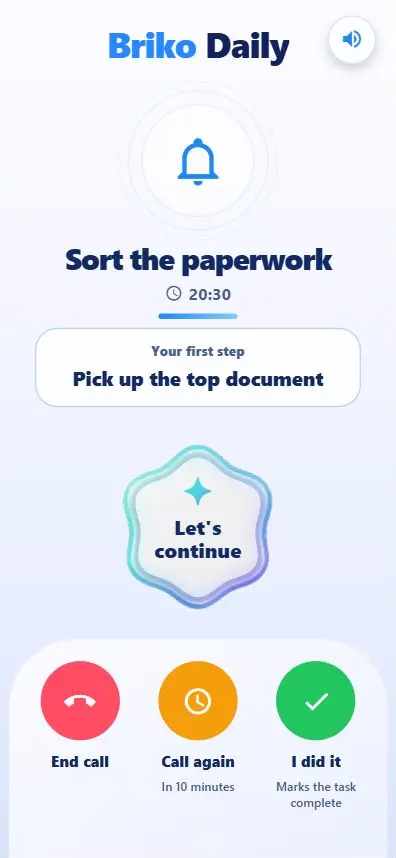
Speak or type a task and choose a time. Briko brings it back with an in-app call-style reminder and, when available, a small first physical step.

Free plan with limits · Android only · Google sign-in required · Not a phone call

SAMPLE REMINDER
Briko reminder example: Sort the paperwork. Your first step: Pick up the top document.
Tap the screen.
Try the reminder.

Interactive sample · no real reminder or audio

A MOMENT WITH BRIKO

From “later”
to one small step.

See a task become a call-style reminder, then try the smaller steps for yourself.

This is an illustrative demo, not the actual app. The real Briko app looks and sounds different. The example is prewritten and time is sped up; no task or reminder is created. The voices are generated by your browser, not recordings from the app.

Select “Start example” to enable sound. You can mute it at any time.

01   Tell Briko02   Reminder03   Start
INTERACTIVE EXAMPLE
briko.

A SMALL START

What’s on
your mind?

Follow a sample task from the first thought to a small action.

No sign-in · no microphone needed

Example only · not a real phone call

01 / THE MOMENT BEFORE

The task isn't always
the hard part.

It's knowing where to begin when the whole thing is on your mind.

HOW BRIKO HELPS

Make the next move
smaller than the task.

Set an in-app, call-style reminder. When available, Briko includes a first physical step to help you begin.

Try the reminder above ↑

THE BRIKO LOOP

One task.
One reminder.
One place to start.

For the work, errands, and plans
that keep getting pushed back.

Try a sample reminder
  1. 01

    Capture the task.

    Speak or type what’s on your mind. Briko helps turn it into a task you can come back to.

  2. 02

    Choose a time.

    Set an in-app call-style reminder. It can include a first physical action, subject to your plan’s limits.

  3. 03

    Find your way in.

    If you’re still stuck, Help Me Start offers smaller guided steps.

INSIDE BRIKO

From the task
to the first move.

01 / 03

Start by telling Briko.

Speak or type a task and a reminder time. This example shows an earlier interface; the current app may look different.

Earlier staged example · interface may differ

Your task. Your pace.

A FEW ANSWERS

Before your
first small move.

Is this another planner?

Briko includes tasks and reminders, but the focus is the moment before you begin: getting a first action, then help taking smaller steps if you’re still stuck.

Is it just for people with ADHD?

It’s designed with ADHD-related starting difficulties in mind. You don’t need a diagnosis to use it. Briko is a productivity tool, not medical treatment.

Can I try it for free?

Yes. The free Android plan includes 100 AI credits and up to 10 call-style reminders per week. Pro and Max are optional paid plans with higher limits; current prices appear in the app. There are no ads in version 174 and later.

Does Briko make a real phone call?

It’s a call-style experience inside the app, scheduled by you. It doesn’t dial your phone number or call other people. Reminder delivery depends on your device settings and notification permissions.

Is the demo generating AI responses?

No. This interactive sample uses a prewritten example and does not create tasks or reminders. The Android app uses AI to help with your own tasks.

What data does this page collect?

This sample does not ask for your task or personal information. Optional Google Analytics may measure website interactions when you consent. You can change your choice in the footer. Read the website privacy notice.

Can I use Briko on an iPhone?

The Briko app is currently available on Android. You can explore this sample in a browser on other devices.

YOU DON’T HAVE TO START BIG

Start somewhere.

Bring the task that’s been living in your head.
Let’s find a way into it.

Find your first move on Android Free plan available. Start at your pace.